
Conversations
AI Agent Management > Chatbots > Inbox
Overview
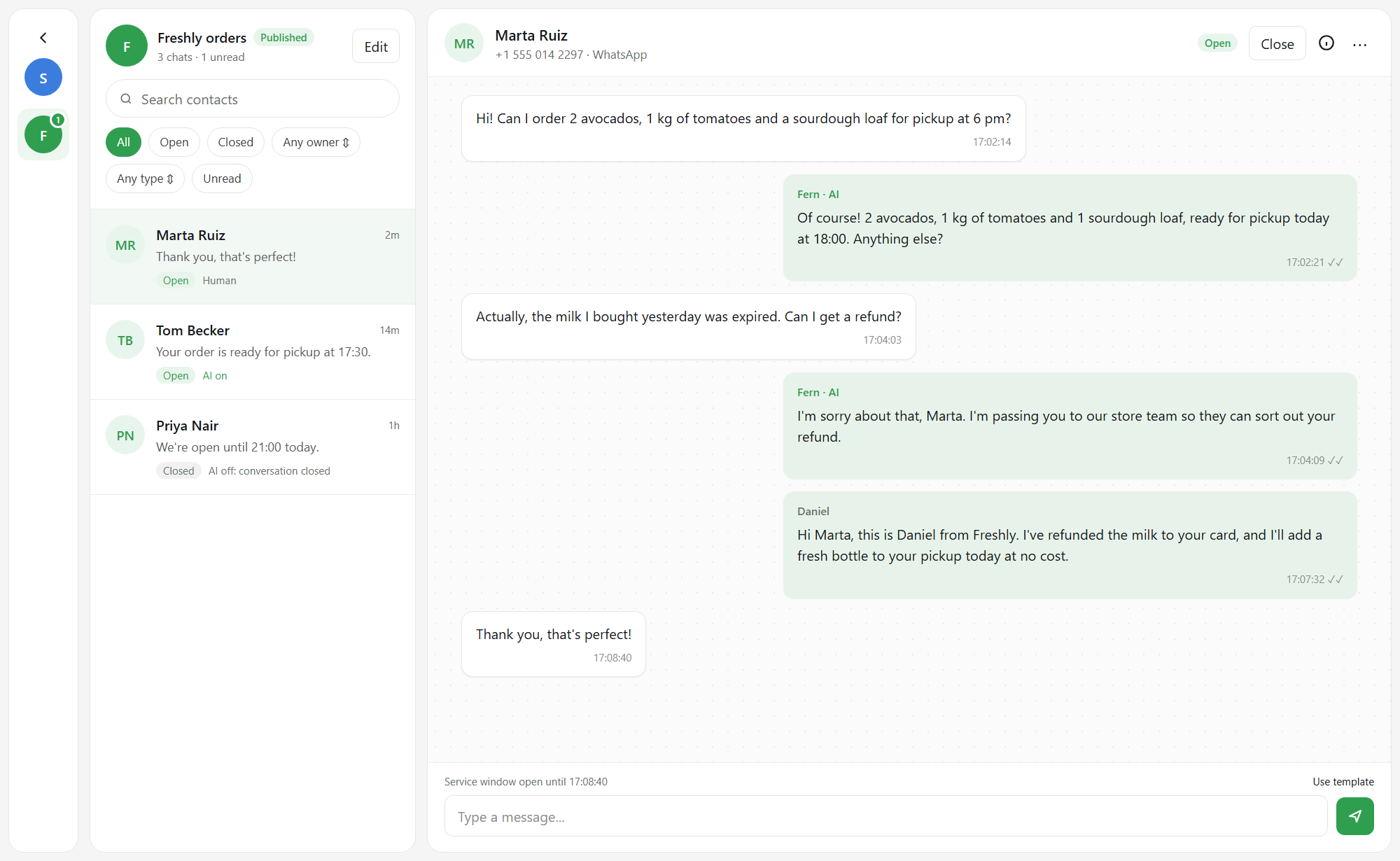
Every chat a chatbot has with a customer is a conversation, and each chatbot keeps its conversations in its Inbox. From there, your team follows what the chatbot is saying, steps in when needed and hands chats back to the AI.
To open an Inbox, go to AI Agent Management > Chatbots and click a chatbot, or choose Open inbox from its menu.
Who can do what
- Admins and Agents can reply, take over and give back conversations, assign, close, reopen and delete them, and retry failed replies.
- Managers see every conversation but can't do any of that. Their Inbox shows "You have read-only access to this inbox." They can still edit contact memory.
See Roles.
Find a conversation
The conversation list shows each contact's name, their latest message and the conversation's status. Use the filters to narrow it down:
- All, Open or Closed.
- Any owner, AI or Human: conversations the AI is answering, or the ones a person took over.
- Any type, Direct or Group.
- Unread: conversations with messages you haven't read.
Use Search contacts to find a conversation by the contact's name or phone number.
Reply as a person
- Open the conversation and click Take over at the bottom. The AI stops replying in this conversation.
- Type your message and press Enter, or click Send message.
- When you're done, open the conversation menu (...) and choose Give back to AI. The chatbot answers the customer's next message.
Taking over affects only that conversation. To stop the chatbot in all of them, pause its channel or return it to Draft. See Subscriptions.
The chatbot can also hand a conversation over by itself when Hand over to human is on. The conversation switches to a person, the customer gets a short notice, and your team gets an email.
Send a WhatsApp template
WhatsApp only allows free-form messages for 24 hours after the customer's last message. The top of the reply box shows Service window open until and the time it closes.
- Within the window, click Use template to send an approved template instead of free text.
- After it closes, free-form messages are blocked and the reply box changes to Approved WhatsApp template. Select a template approved in your Meta account, fill in its Template parameters and click Send template.
Templates are created and approved in your Meta Business account, not in ElectroNeek.
Conversation actions
From the conversation's menu:
- Assign to me / Unassign: show your team who's handling it.
- Close conversation / Reopen conversation: closing keeps the history. Reopen it before sending another message.
- Mark as read / Mark as unread: read status is kept per person.
- Retry AI reply: appears when a reply failed. If a tool had already run in that reply, for example a booking was created, the retry is refused with a message so the action doesn't run twice. Check the result and reply yourself, or wait for the customer's next message.
- Delete conversation: permanently deletes its messages, attachments and contact memory from that conversation.
Contact details
The panel on the right shows who you're talking to:
- AI summary: a short summary of the conversation so far.
- Custom properties: the contact fields your chatbot collects.
- Contact memory: facts the chatbot learned about this contact, such as the ones you set in Contact memory fields. The chatbot uses them in later conversations with the same contact.
Admins and Managers can edit and correct contact memory and custom properties. Agents can read them.
Messages and limits
AI replies and handover notices count toward your organization's monthly message allowance. Replies and templates sent by your team don't, and incoming messages are free. When the allowance is used up, the chatbots stop replying until next month, but your team can still take over and reply. See Limits.
Data retention
Conversations, their attachments and contact memory are kept until you delete the conversation or its chatbot. Closing a conversation doesn't delete anything. See Data Processing.