
Overview
Overview of ElectroNeek's AI Agent Management module.
Introduction
The AI Agent Management module allows users to create Cloud-native workflows that combine the power of customizable AI Agents with SaaS apps, human inputs (via Chats and Forms, for example), as well as combining the power of ElectroNeek's powerful RPA and Intelligent Document Processing capabilities.
The basic units of this module are AI Workflows. They are created in a browser-based, no-code visual environment.
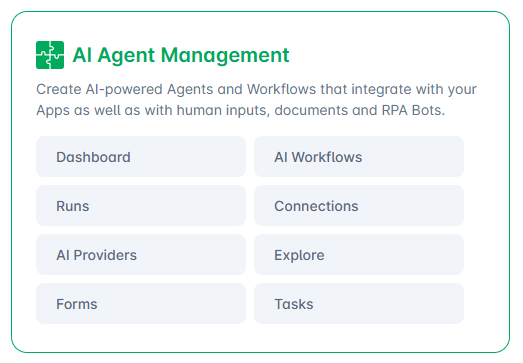
This module consists of the following pages:
- Dashboard: Review your team's activity and time savings over time.
- AI Workflows: Create, manage and publish AI Workflows and Tables.
- Runs: Monitor and manage your workflow's executions.
- Connections: Control and edit connections to your SaaS apps.
- AI Providers: Bring in your own AI providers to use within your workflows.
- Explore: Browse through pre-created workflow templates that can be imported in one click.
- Forms: Create and manage customizable web forms that can be shared publicly to trigger AI Workflows.
- Tasks: Review Forms assigned to you within your team's workflows.
Top Capabilities
- User-friendly, no-code visual workflow builder.
- Create unlimited tool-enabled and web search-capable AI Agents within your workflows.
- Bring your own AI providers, including support for OpenAI, Anthropic, Google Gemini and more.
- +500 pre-built connectors with leading SaaS applications.
- Trigger your workflows via events on SaaS apps, webhooks, schedules or on-demand (via Chats or Forms.)
- Native integration with ElectroNeek's own RPA Bot Orchestration and Document Intelligence modules.
- Built-in support for Tables, Storage and Work Queues.
- Ever-expanding collection of connectors and templates.
Migration from Legacy products
All organizations that had access to AI Agents before the launch of AI Workflows received a complimentary upgrade to AI Workflows in their licensing. Please contact Sales if you have any questions.
Please review this section if you have any Processes, AI Agents and/or IntegraBots flows in current operation.
These products will be decommissioned after the grace period.
End of grace period: July 31st, 2026
With the launch of AI Workflows, three of our pre-existing products have obtained Legacy status: Processes, AI Agents and IntegraBots. As such, we have hidden them from the User Portal -- however, they are still accessible through their URLs during the grace period:
- URL for direct access to Legacy Processes: https://electroneek.com/account/processes
- URL for direct access to Legacy AI Agents: https://electroneek.com/account/ai-agents
- URL for direct access to Legacy IntegraBots: https://electroneek.com/account/integra-bots
In the below sections, you will find some tips on re-creating the content you produced in these Legacy products with the new AI Workflows.
Migrating from Legacy Processes
The features available in Legacy Processes have equivalent features in AI Workflows. Please review the table below to identify them:
| Feature | Legacy Processes | AI Workflows |
|---|---|---|
| Triggers | Manual Trigger Form Trigger Webhook Trigger | Triggers: Utility > Manual Trigger Triggers: ElectroNeek > Public Form Submitted Triggers: Utility > Webhook |
| Integration with AI Agents | AI Agent Stage | Actions: AI > Run Agent Action |
| Integration with RPA Bots | RPA Bot Stage | Actions: ElectroNeek > Run RPA Workflow Action |
| Assign Forms to users | Form Stage | Actions: Approvals (Native integration with Forms & Tasks in roadmap) |
| Logic steps (If conditions) | Logic Stage | Actions: Router |
| Customizable API calls | HTTP Call Stage | Actions: Utility > HTTP |
| Status toggle | Draft / Active | Draft / Published (when Published: Enabled / Disabled) |
| Access control | Granted to individual users or Security Groups | Granted to full team (Granular access in roadmap) |
For each existing Legacy Process, we recommend creating 1 new AI Workflow which leverages the appropriate Trigger and Actions as per the table above. Please review the Integrations section for more details on each one.
Migrating from Legacy AI Agents
In AI Workflows, you can use the AI > Run Agent Action to create AI Agents with customizable prompts, tools, web search capabilities and much more. Please review the AI & Agents page in the Integrations section for more details.
Migrating from Legacy IntegraBots
AI Workflows shares many of the features of Legacy IntegraBots, making migration between them quite simple.
In some cases, depending on the integrations used, you may be able to export and import Legacy IntegraBots flows into AI Workflows by following these steps:
- Log into the User Portal and navigate to Legacy IntegraBots
- Find the flow you want to export and open it
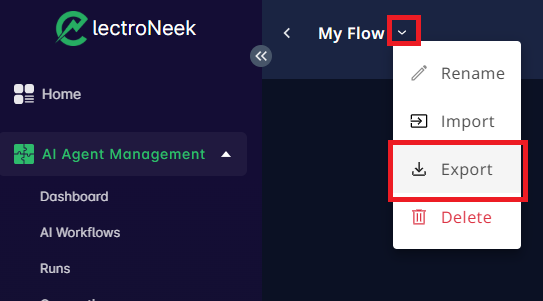
- On the top right, click the small downward-pointing arrow that is located at the right of the flow's name.
- From the menu that appears, select the "Export" option. A file called "template.json" will be created. Feel free to rename it if you want.
- Navigate to AI Workflows
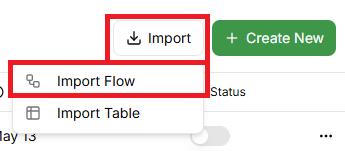
- Click on the "Import" button and select "Import Flow".
- In the "Import Flow" window, upload the JSON file downloaded in step 4. If you want to import the flow to a folder, select it before clicking "Import".
- Once the import is done, you will be sent directly to the imported flow.
It's possible that the imported flow is not fully compatible with the structure and integrations in AI Workflows, in which case, you will have to manually replace the missing Triggers or Actions in the imported flow. You should be able to find all of the previous integrations with the same, or even more, Triggers and Actions available than in Legacy IntegraBots.