
November 2026.01 Platform Update: Contact Support right from Studio Pro and Bot Runner
We are proud to announce a new update to the ElectroNeek Platform. With this release, you can ask our Support Team for help without leaving Studio Pro or Bot Runner. It also brings fixes to Public Forms, AI Workflows, Studio Pro and Bot Runner.
This release includes Bot Runner 12.0.30 and Studio Pro 12.0.30.
What's New
Contact Support from Studio Pro
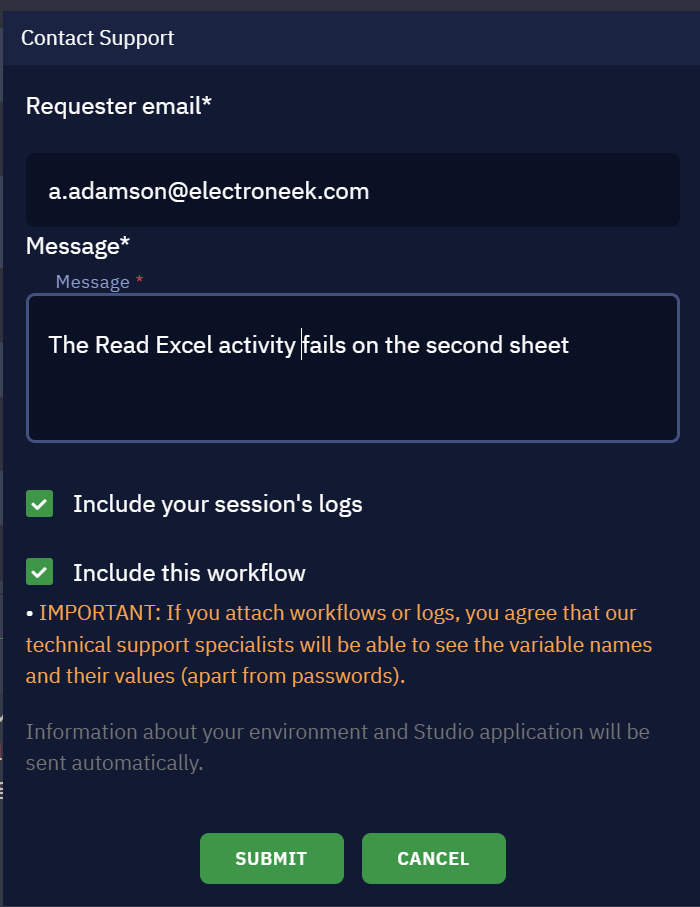
In Studio Pro, go to Help > Contact Support to send a request to our Support Team. Describe the problem, confirm the email we should reply to, and choose whether to include your recent logs and the workflow you're working on. Studio Pro adds its version and basic information about your computer, so you don't have to look them up.
The request goes to the Support Center like any other, so you can follow it and reply there.
Contact Support when a run fails in Bot Runner
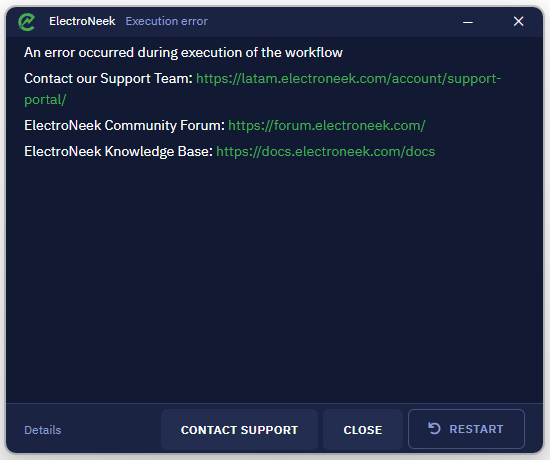
When a workflow fails in Bot Runner, the error window now has a CONTACT SUPPORT button. Bot Runner fills in the details of the failed run for you: the project, file, activity, error message and time. Add an optional message, confirm your email and submit. The log of that run is attached, so our team can start looking right away.
Contact Support is available when Bot Runner is connected to Orchestrator with a token.
Learn more in Support Center.
Public Forms and AI Workflows fixes
Public Forms submit correctly again, and their buttons and messages show in your language. Wait for Task and the Public Form Submitted trigger now work in unattended flows, with nobody signed in to the Portal.
Summary of all changes
The following is a summary of all changes in this release:
Studio Pro
- Contact Support (Help menu) now sends your request to the Support Center, with an editable reply-to email and optional logs and workflow.
- Fixed: setting a breakpoint by clicking an activity's input port was hard at some zoom levels.
Bot Runner
- Added Contact Support to the error window when a workflow fails, with the run's details and log.
- Fixed errors when logging out or switching tokens. A wrong token can now be corrected and retried.
- Fixed queued integration items not being delivered.
- Fixed a "Connection To Robot Error" message that could appear once when Bot Runner starts.
- Launch errors are now clearer than "Unexpected error during running script", and a run that finished is no longer marked as failed.
Studio Pro and Bot Runner
- Fixed Dr.Web antivirus flagging and quarantining the app.
Support Center
- Requests from Studio Pro and Bot Runner show in your Support Center with the rest of your requests. Files attached from the apps are visible only to our Support Team.
AI Agent Management
- Fixed Public Forms failing to submit.
- Public Form buttons and messages now show real text in every language.
- Wait for Task and the Public Form Submitted trigger now work in unattended flows.
- The flow editor's side panel keeps its width when you move the window to another monitor.
Portal
- Fixed a sign-in error (431) caused by old cookies in the browser.
- Security Groups that are no longer used can be deleted again.
- The organization picker shows a single list of your organizations.
Documentation
- Questions about the latest release now get the newest Release Notes in the docs search and the docs assistant.
We can't wait for you to try these updates. As always, keep your feedback coming through the Support Center.