
March 2026 Platform Update: Console Logs, New Studio Pro Features, and Microsoft SSO
We are proud to announce a new update to the ElectroNeek Platform. This update includes fixes, improvements and optimizations for Studio Pro, Bot Runner, Orchestrator and the User Portal.
This release includes Bot Runner 12.0.13 and Studio Pro 12.0.14.
What's New
Enhanced Console Logs sync with Orchestrator
In the past, Console Logs would have issues synchronizing with Orchestrator, sometimes displaying with incorrect or missing information, and sometimes not displaying at all. To fix this, we performed a complete rewriting of the Console Logs synchronization mechanism in both Orchestrator and Bot Runner.
Additionally, Console Logs now display the fully-detailed time (up to the millisecond) in which the event occurred, instead of only the date. The ability to sort events in the Console Log by date and time has also been added.
Microsoft Support for Single Sign-On (SSO)
We have added support for Single Sign-On (SSO) using Microsoft accounts in the ElectroNeek User Portal. As was possible in the past with Google accounts, users can now register and log into the ElectroNeek Portal with their Microsoft accounts, eliminating the need for an additional credential for companies who already rely on said service.
Resizable "For Each" Loop box
When adding "For Each" activities to their workflows (such as For Each Row and For Each Email), developers used to be restricted to a very small space (the "Loop box") where they could add the steps that the workflow would perform while inside the For Each loop. To address this, we have added the ability to resize the Loop box freely. You can now fit even complex, multi-branch workflows inside!
All you need to do in order to resize a Loop box is select it, after which you will see a small icon on the bottom-right corner of the box. Simply drag this corner freely to set the new size. Just remember: if you try to make a Loop box smaller after having expanded it, the activity blocks that used to fit inside it might no longer do, and they will automatically disconnect from the Loop terminals (the "For each ___" block and the "Loop end" block.) You can fix this by using Undo, or by stretching the Loop box again and reconnecting the blocks.
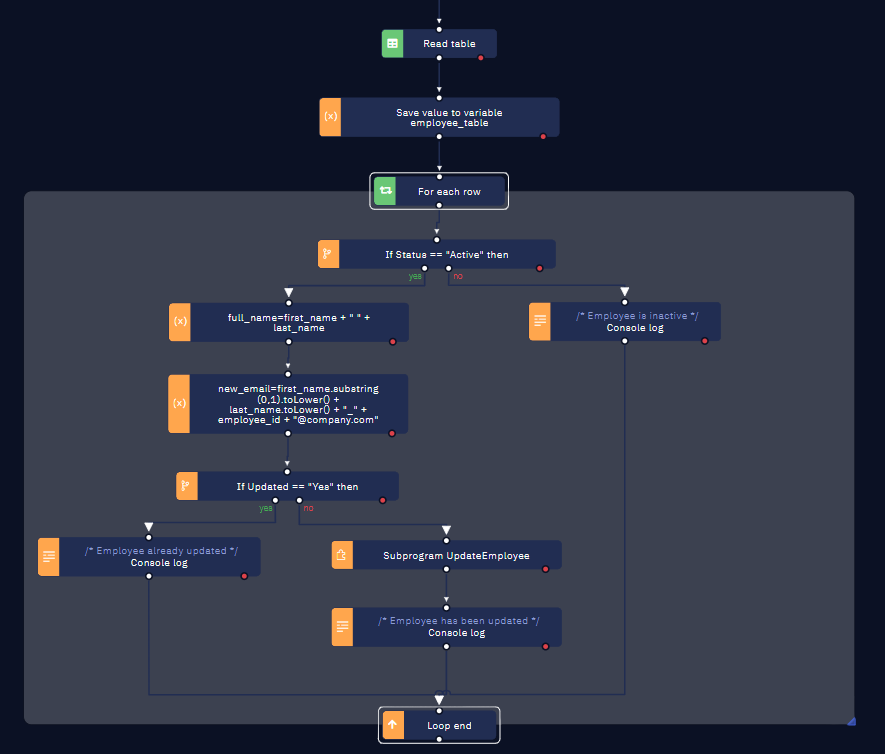
As of Studio Pro 12.0.14, you cannot place a For Each loop inside of another one. Please use the "Do-while loop" activity as an alternative.
Size increase for Output Variables
In version 12.0.14 of Studio Pro, addressing another popular user request, we have increased the maximum character limit for Output Variables from 2000 to 2,500,000 (2,5 million), an increase by a factor of 1250.
This increase allows for workflows to puss much larger pieces of data to whichever interface is launching it and requesting its output -- other workflows, calls to the Orchestrator API, Processes, AI Agents, and more.
Support for PATCH method in HTTP Request
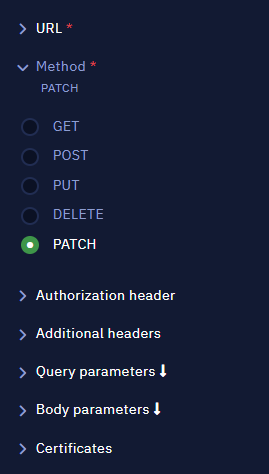
The HTTP request activity in Studio Pro now supports the PATCH method as well, allowing for more API integrations that previously required lengthy workarounds.
The following is a summary of all changes in this release:
Studio Pro
- Added the ability to resize the For Each Loop box element in all activities that use it.
- Added the PATCH method in the HTTP request activity (Programming > API).
- Increased the maximum amount of characters allowed for Output Variables from 2,000 to 1,000,000.
- Modified warning and error messages in the built-in Console to be automatically expanded upon appearance.
- Fixed an issue where Bot Runner would open unexpectedly when Studio Pro started.
- Fixed an issue where a message would pop up indicating that Studio Pro had lost connection.
- Fixed an incorrect message that mentioned "Your Team license has expired" when first using Studio Pro.
- Fixed incorrect and outdated links to documentation in certain sections of the application.
- Fixed typos in the Get OAuth token activity (Programming > API).
Bot Runner
- Implemented a new mechanism for analytics to improve Console Log synchronization with Orchestrator.
- Addressed unhandled exceptions in the .NET layer.
- Implemented state tracking and debouncing to prevent duplicated WebSocket connections.
- Added an exponential backoff mechanism for connection retries to the Browser Extension to improve resilience.
- Implemented support for PATCH in HTTP request steps.
Orchestrator
- Added support for the increase in Output Variables maximum character size.
- Added support for the new analytics mechanism for Console Logs.
- Added the ability to sort Console Log events by Date and time.
- Modified Console Log events to show date and time up to the millisecond, rather than just date.
- Improved the way in which the Scheduler added launches to the Queue to make it more reliable.
Other Updates and Fixes
- Added Microsoft Single Sign-On (SSO) support to the User Portal.