
October 2026 Platform Update: Major Updates for AI Workflows and Orchestrator + Full On-Premises
We are proud to announce a new major update to the ElectroNeek Platform. Since our last update in May, we have shipped improvements and fixes across AI Agent Management, Document Intelligence, Orchestrator and the User Portal. Additionally, the full platform is now supported On-Premises. This note covers all of them. Updates to Studio Pro and Bot Runner will follow in a separate release.
What's New
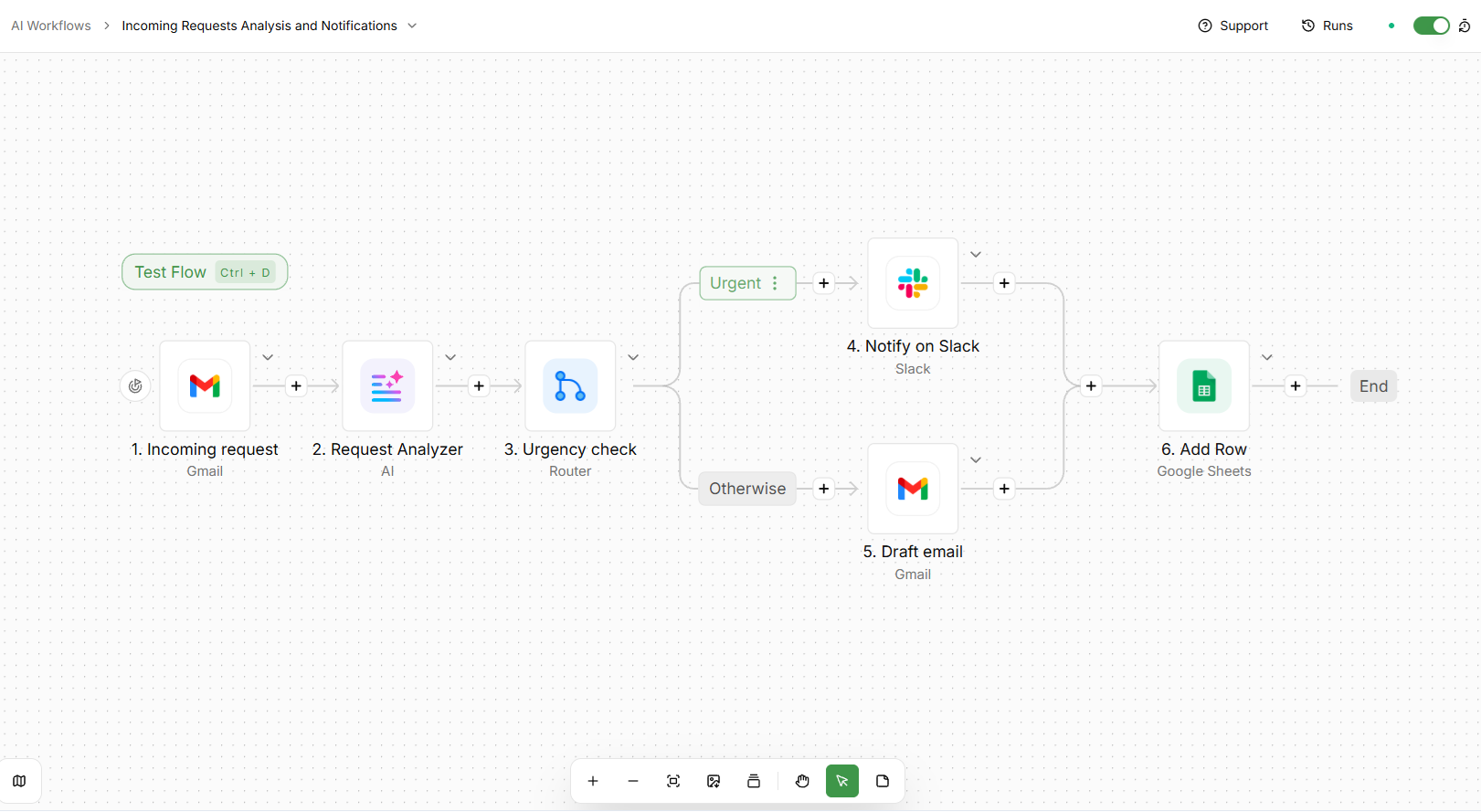
A major upgrade to AI Workflows
We upgraded the engine behind AI Workflows to a much newer version, with updated pieces and new AI capabilities. Existing flows keep working as before, including flows that use earlier versions of the ElectroNeek piece.
Here's what's new with the upgrade:
Smarter AI Agents
- Run Agent now loads models from your AI Provider rather than a pre-approved list.
- Agents can now leverage ElectroNeek Forms and 11 more endpoints from the Orchestrator and IntelliDocs APIs.
- A rich text editor for the agent prompt, and a picker for the AI provider and model.
A faster builder
- Test a step in one click from the canvas, with a redesigned test panel, a friendlier output view and an improved data selector.
- Formula and data functions to transform values without code, in actions and triggers.
- Error handlers on steps, sticky notes, a minimap and a horizontal layout option.
- Flows and tables can be organized in folders.
- Step versions no longer upgrade on their own. You choose when to upgrade or downgrade a step.
- Action descriptions in the step selector, with deprecated steps hidden.
Easier debugging
- Failed steps show a clear error, with a shortcut to the step.
- A step timeline and a latency timeline for each run.
- Paused or queued runs can be cancelled.
- Failure alert emails include the failed step's details and can go to the flow owner.
- Waiting steps can have a deadline.
Variables, tables, connections and approvals
- Added the ability to store and manage Variables for all of your flows.
- Tables: create, clear, delete and download tables from a flow, reorder columns by drag and drop, and export to CSV.
- Connections show the connected account and its status, can be rechecked, and let you choose which permissions to grant.
- Request approvals from Gmail, Outlook, Microsoft Teams or Telegram.
- Webhooks accept binary files and can verify HMAC signatures.
New and Updated integrations
126 new connectors have been added, taking our total to 707! We also updated existing integrations with new actions, including Excel 365, Google Sheets, Slack, OpenAI, Gemini, PDF, Text Helper, and dozens more.
The new connectors include:
- DocuWare: document management, built by ElectroNeek.
- Microsoft 365 Copilot: bring Copilot into your flows.
- Microsoft Teams Bot: let agents talk to users in Teams.
- Workday: HR and finance records.
- Coupa: procurement and spend management.
- Azure Active Directory: manage users and groups.
- Jira Data Center: self-hosted Jira.
- Google BigQuery: query your data warehouse.
- Freshservice: IT service management.
- MCP Client: connect your flows to any MCP server.
And many more! See the full list in Integrations.
Full Platform now available On-Premises
In the past, only the RPA module of the ElectroNeek Platform was available for On-Premises deployment. In this release, we are happy to announce that all 3 modules are available, including AI Agent Management and Document Intelligence. Learn more in On-Premises.
Redesigned Orchestrator pages for Workflows and Bot Runners
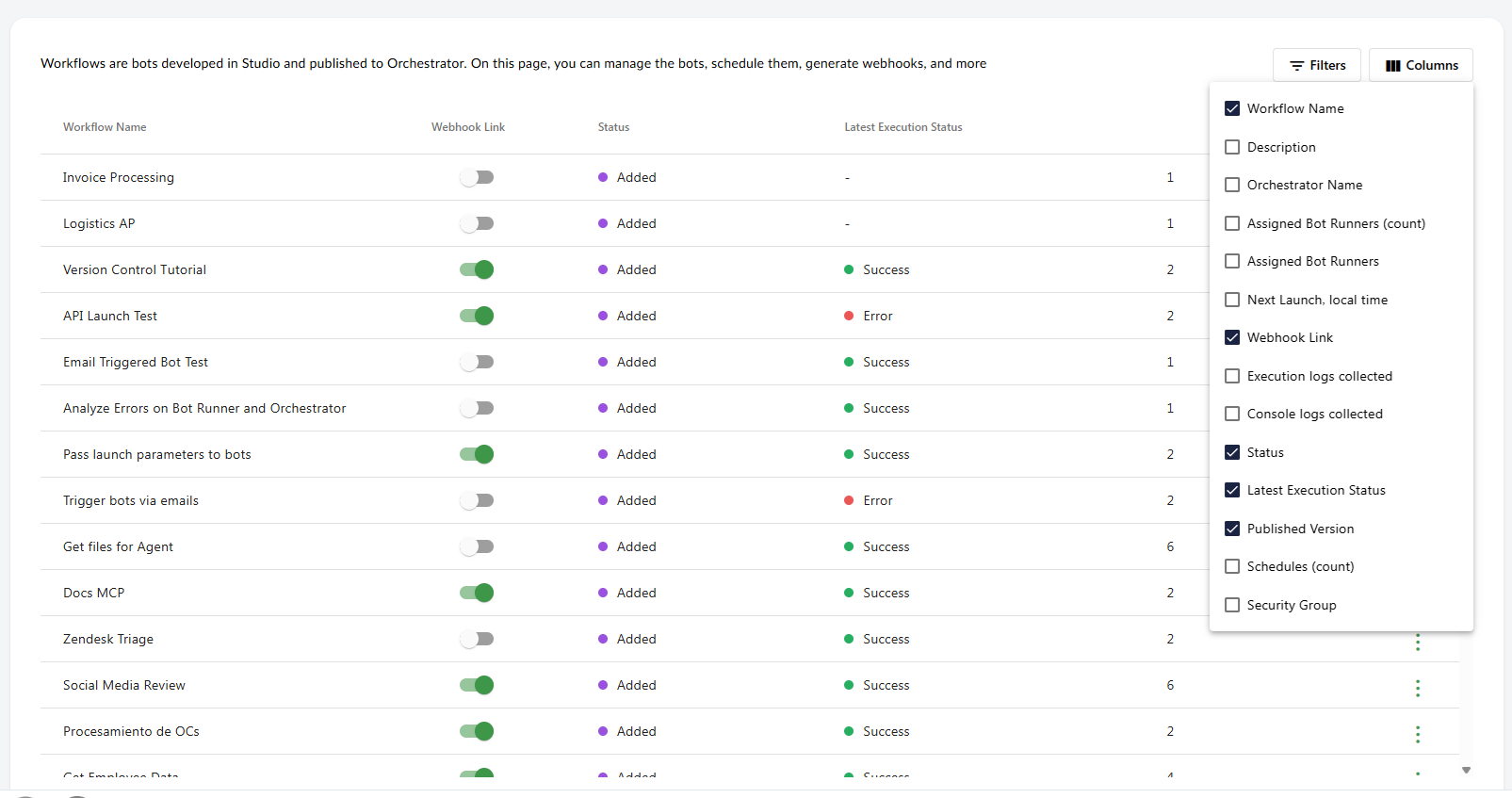
The Workflows list in Orchestrator has been rebuilt so you can see exactly what you need. You can now choose which columns to show, including assigned Bot Runners, next launch time, latest execution status, published version, number of schedules and Security Group. Every column can be sorted, and you can filter by any of them: type to search text, compare numbers, pick values from a list, or set a date range. The Actions menu now includes Copy Workflow ID, and Launch and Copy Webhook Link are greyed out when they are not available.
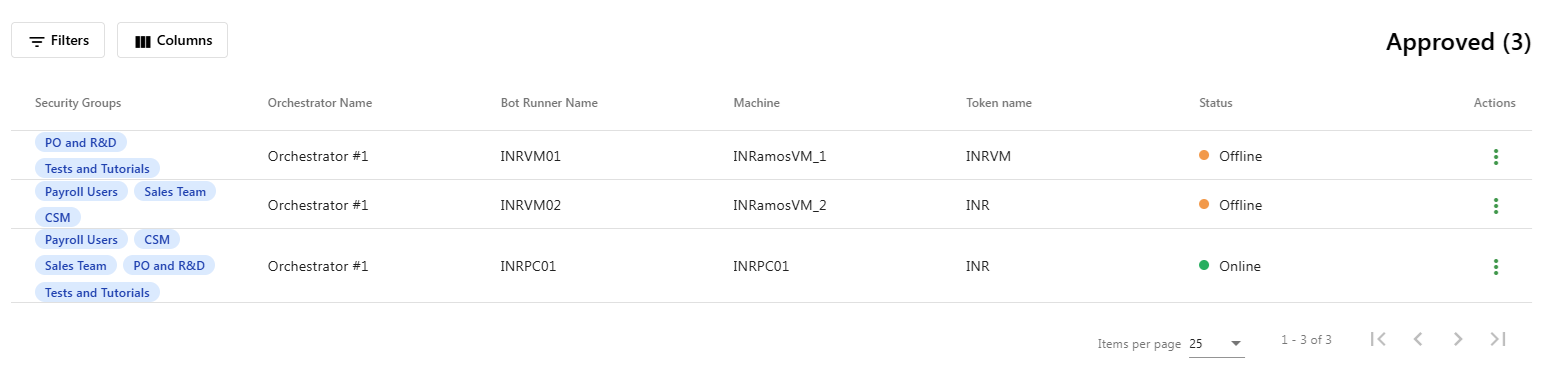
The Bot Runners page got the same treatment. Pick the columns you want (Orchestrator, Bot Runner name, machine, token, status and Security Groups), filter by any of them, and use the new Actions menu to view a Bot Runner's Runs history, copy its ID or delete it.
Forms are back in your automations
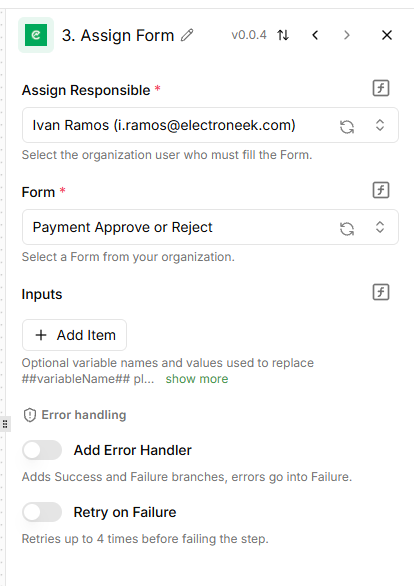
Forms now work inside AI Workflows. Two new actions in the ElectroNeek piece let you put a person in the loop: Assign Form sends a Form to a user as a Task, with any data from earlier steps, and Wait for Task pauses the flow until that person submits it, then returns their answers.
Dynamic variables also work across the whole Form now. Use ##variable_name## in titles, question names, logic and expressions, not only in placeholder text, and pass numbers, true/false values, lists or JSON objects as well as text.
Know how long a launch waited in the queue
The Runs history of each workflow used to show only Time and Duration. For queued launches, that mixed the time spent waiting with the time spent running. These two columns are now replaced by four: Created at, Time in queue, Execution start and Execution duration. This change came from a request in our Ideas Portal.
Choose which Bot Runner runs each schedule
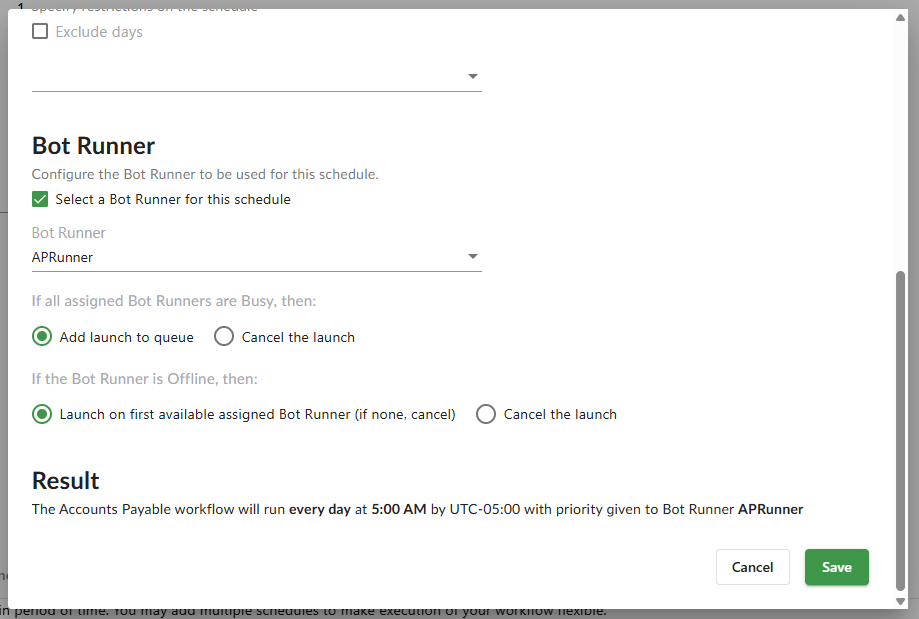
When you create a schedule, you can now pick the Bot Runner that should run it, and decide what happens if that Bot Runner is busy (queue the launch or cancel it) or offline (use the first available assigned Bot Runner, or cancel). If you don't pick one, the schedule works as before. The Schedules list also has a new Bot Runner column.
We also fixed how schedules spread launches across several assigned Bot Runners: when the first one is busy, the next available one takes the launch.
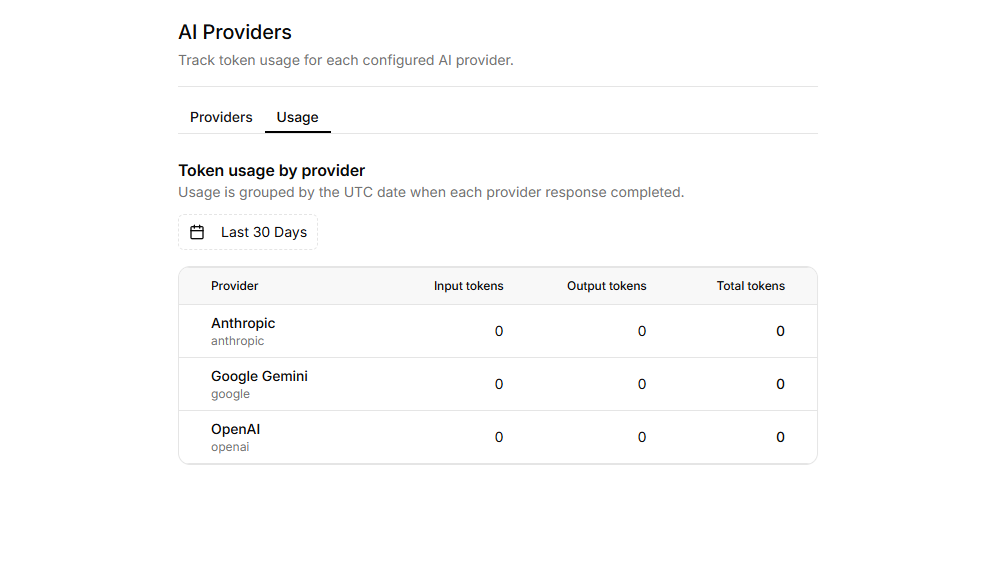
Track token usage with AI Providers > Usage
A new Usage page under AI Providers shows how many tokens each of your connected AI providers has consumed, so you can keep an eye on costs without leaving the Portal.
More ways to control your RPA bots from AI Workflows
The ElectroNeek piece has 11 new actions that mirror the Orchestrator and IntelliDocs APIs: get launch info, list workflows, get workflow info and launch summaries, stop a launch, cancel a queued launch, list Bot Runners, get Bot Runner info and launches, stop a Bot Runner, and check the page limit of a Document Stream.
The Run RPA Workflow action is also easier to use. The Bot Runner list now shows only the Bot Runners assigned to the selected workflow, and the action only shows the input fields that match the input mode you picked (Simple or Advanced JSON). When an AI Agent uses Run RPA Workflow as a tool, it now sends the input values correctly.
Customize your Chat UI
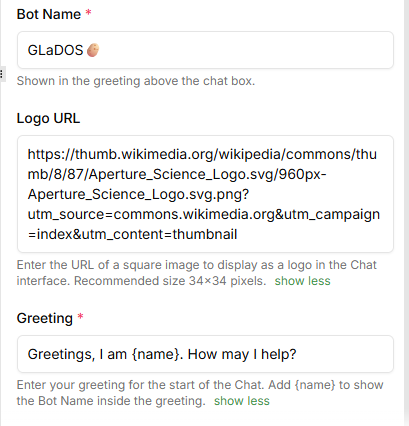
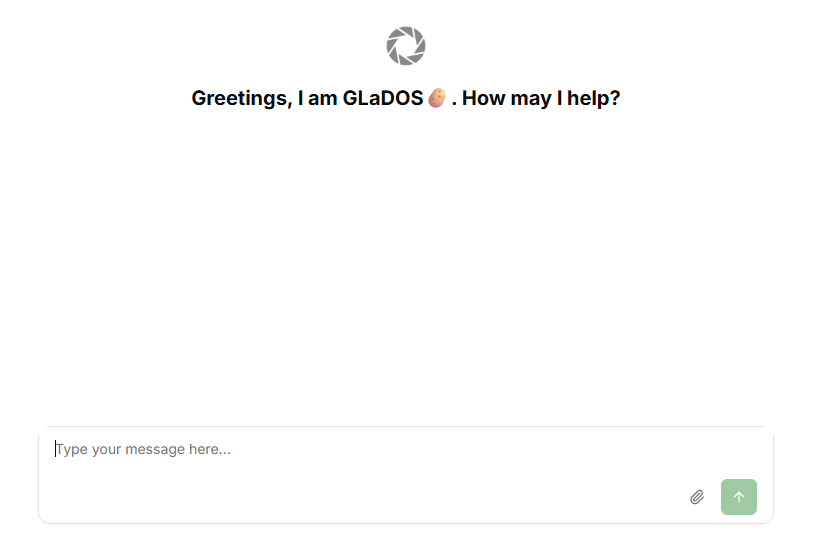
The Chat UI trigger now lets you set your own logo and a custom greeting message, in addition to the bot name.
The Platform, now in five languages
The Portal is now fully translated into Spanish, Portuguese, French and German!
Newer AI models in IntelliDocs and Easley AI
IntelliDocs and Easley AI have been upgraded to use the latest models from OpenAI. Try them out!
Summary of all changes
The following is a summary of all changes in this release:
AI Agent Management
- Upgraded the AI Workflows engine to a newer version, keeping existing flows compatible. This upgrade includes dozens of updates, as well as over 120 new connectors.
- Added the Assign Form and Wait for Task actions to the ElectroNeek piece, to assign Forms as Tasks and wait for their answers inside a flow.
- Forms: dynamic variables (
##variable_name##) now work in every part of a Form and accept numbers, booleans, lists and JSON objects. - Tasks created by AI Workflows now show in the Tasks section and can be completed there.
- AI Workflows now uses the language selected in the Portal.
- Added the AI Providers > Usage page to track token consumption per provider.
- Added 11 new actions to the ElectroNeek piece for Orchestrator workflows, launches, Bot Runners and Document Stream page limits.
- Run RPA Workflow: the Bot Runner list now only shows Bot Runners assigned to the selected workflow.
- Run RPA Workflow: input fields now change depending on the selected input mode.
- Run RPA Workflow: fixed incorrect input values when the action is used as an AI Agent tool.
- Added Logo and Greeting options to the Chat UI trigger.
- Run Agent now lists all models available from the connected AI provider.
- Improved authentication for Google, Microsoft, Slack and HubSpot connections.
- Improved the message shown when AI Workflow Runs fail for lack of available quota.
- The saved AI Workflows counter now updates right after you delete a flow, not after a refresh.
- Fixed runs failing with Quota Exceeded even when runs were available.
- Fixed the 504 errors and Request Header or Cookie Too Large errors.
- Fixed the Google Drive and Google Calendar pieces not loading folders and calendars.
- Fixed the Linear piece failing to connect with a valid API key.
- Fixed the Facebook Leads trigger not starting runs.
- Fixed editing Date columns in the Table Editor.
- Fixed the sidebar highlighting AI Workflows while on the Runs or Connections pages.
- Hid deprecated ElectroNeek pieces.
- The built-in ElectroNeek Portal connection used by Public Forms is now managed automatically and no longer appears in your Connections list.
- Removed the Usage block that overlapped content on template pages in Explore.
Document Intelligence
- Upgraded the AI engine that IntelliDocs uses to one of the latest available models.
- Fixed Bulk Recognition jobs that could stay in progress for days.
Orchestrator
- Redesigned the Workflows page with column selection, filtering and an updated Actions menu.
- Redesigned the Bot Runners page with column selection, filtering and a new Actions menu (View, Copy Bot Runner ID, Delete).
- Orchestrator is now available in Spanish, Portuguese, French and German.
- Replaced the Time and Duration columns in Runs history with Created at, Time in queue, Execution start and Execution duration.
- Added the option to choose a Bot Runner for each schedule, with rules for when it's busy or offline, and a Bot Runner column in the Schedules list.
- Fixed schedules not sending the launch to the next available assigned Bot Runner when the first one is busy.
- Fixed queued launches not running in the order they were added.
- Fixed schedules not launching workflows.
- Fixed Error 401 when launching workflows.
- Console Logs now show millisecond timestamps on the page.
- Console Logs of a running launch now update the launch status in real time, without a loading overlay over the list.
- Console Logs no longer show No console logs before the logs finish loading.
Other Updates and Fixes
- Completed Spanish, Portuguese, French and German translations of the User Portal.
- Upgraded AI model behind Easley AI.
- Fixed AI Agent Management permissions in APAC and EMEA organizations, and its Home page visibility.
- On-Premises: AI Agent Management and Document Intelligence are now available in On-Premises deployments.
Known issues
- Orchestrator > Workflows: switching a toggle column (Webhook Link, Execution logs or Console logs) while on a page other than the first takes you back to page 1. A fix is planned for an upcoming release.
- Orchestrator > Bot Runners: newly connected Bot Runners may not appear in the Not approved list, even though the counter shows them. A hotfix is upcoming.
We can't wait for you to try these updates. As always, keep your feedback coming through the Support Center to help shape what comes next.